Dryer Stops After 5 Minutes: Troubleshooting Guide
Diagnose and fix a dryer that stops after 5 minutes with practical, safety-first steps from Easy DryVent for homeowners and DIY enthusiasts to restore performance and prevent hazards.


If your dryer stops after 5 minutes, the most likely issue is overheating or a vent blockage. Start with simple checks: clean the lint trap, inspect the vent hose for kinks, and ensure the exterior vent is clear. If the problem persists, test the outlet and consider a safety component like the thermal fuse. If unsure, contact a technician.
Symptom clarity and why it matters
When a dryer stops after 5 minutes, it signals an underlying airflow, safety, or electrical issue that can escalate with continued use. The exact phrase dryer stops after 5 minutes helps you distinguish heat buildup from a blocked vent or sensor fault. According to Easy DryVent, begin with quick, low-risk checks before disassembling any components. A visual inspection of the lint trap, duct, and exterior vent often reveals the root cause. If the dryer stops after 5 minutes, note whether the drum turns, whether you feel heat, and whether any burning odor is present. Collecting these observations accelerates accurate diagnosis and safe repair.
- Quick symptom log: time to stop, heat presence, drum rotation, odor.
- Safety note: unplug the unit before inspection and never bypass a fuse.
- Quick win: remove lint from trap and clean the vent end.
According to Easy DryVent, documenting symptoms creates a clear trail for future maintenance and helps you avoid repeating the same mistakes during repairs.
Overheating: the primary culprit when a dryer stops after 5 minutes
Overheating is the most common reason a dryer halts early. When airflow is restricted, the drum heats too quickly or unevenly, triggering the dryer's high-limit thermostat or thermal fuse to shut the machine off to prevent a fire. If your dryer stops after 5 minutes, check for heat at the exhaust and verify whether the drum spins freely without unusual resistance. A failed moisture sensor or a worn belt can also mask overheating symptoms. If heat is present but the cycle stops, suspect restricted airflow as the root cause and move to vent inspection before replacing any parts.
Key checks:
- Feel for warm air at the vent during operation.
- Inspect for a burned smell or melted lint near the exhaust.
- Verify the belt tension and drum rotation visually during a test run.
Address overheating by restoring airflow and removing lint buildup, then retest on a short cycle to confirm improvement.
Venting and airflow: how blocked ducts cause premature shutdown
Blocked or kinked ducting is a frequent driver of premature dryer shutdowns. When lint collects in the vent or the exterior vent is restricted, heat cannot escape efficiently, causing the dryer to redline and eventually trip the safety controls. A clogged vent not only slows drying but also increases energy consumption and fire risk. Start with a hands-on vent check: inspect the lint trap, disconnect the vent hose, and look for visible blockages inside the duct. Use a flexible brush or vacuum attachment to remove clogs from accessible sections. Inspect the outside vent hood for obstructions (wasp nests, debris, snow), and clear as needed. If you notice reduced air flow on the outside vent, you likely have a venting issue.
Maintenance tips:
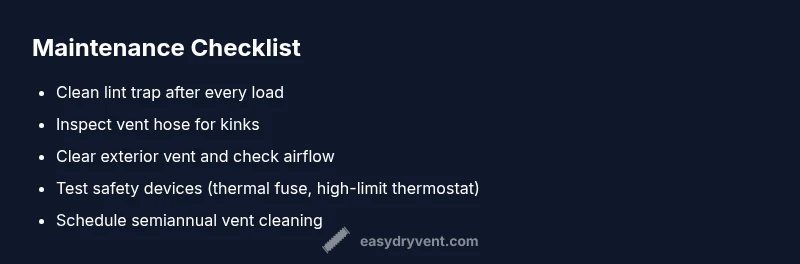
- Clean the lint screen before every load.
- Inspect the vent hose for cracks or kinks.
- Schedule semiannual vent cleaning if you notice slow drying times.
Internal components to inspect: thermal fuse, high-limit thermostat, moisture sensor
If airflow and venting seem sound but the dryer still stops after 5 minutes, internal components may be failing. A blown thermal fuse or a faulty high-limit thermostat can trip the system independently of lint or vent issues. The moisture sensor detects dampness and can prematurely end cycles if it misreads moisture levels. Testing these parts usually requires a multimeter and model-specific knowledge, so consider consulting the service manual or a professional if you are not comfortable with electrical testing. In many cases, replacing a blown fuse restores function but does not fix the underlying cause of overheating, so vent checks remain essential.
Self-checks:
- Locate the thermal fuse and high-limit thermostat and compare readings to your model's specifications.
- Inspect the moisture sensor for residue or mineral buildup and clean gently with a dry cloth.
- If a fuse is blown, do not bypass it; replace and test with proper venting in place.
Electrical checks and simple diagnostics you can perform safely
Electrical issues can mimic the symptoms of overheating, including the dryer stopping after 5 minutes. Always begin with safety: unplug the unit, turn off the circuit breaker, and use a non-contact voltage tester to confirm power is off before touching any wires. Basic checks include inspecting the power cord for damage, testing different outlets, and ensuring a stable 120V supply if applicable. Loose connections at the terminal block or a worn door switch can interrupt cycles.
Safe diagnostic steps:
- Unplug and reset the breaker for a minute, then retest on a known-good outlet.
- Check the door switch and latch for proper engagement.
- Look for burnt marks on wiring or a scorched plug; if present, discontinue use and consult a pro.
Diagnostic tips: quick-reference flow to pinpoint the cause
Use a logical flow to identify the culprit quickly. Start with the easiest checks (lint removal, vent inspection, power source) and progressively move to component testing if needed. Build your flow like this:
- Confirm the outlet supplies power consistently.
- Clean lint trap and vent; ensure air exits freely.
- Run a short test cycle while feeling for heat and airflow.
- If the issue persists, test the thermal fuse/high-limit thermostat and moisture sensor.
- If you cannot verify components safely, stop and call a professional.
This approach aligns with best practices for safe DIY troubleshooting.
Prevention: maintenance routines to prevent future halts
Prevention is the best cure for dryers that stop after 5 minutes. Establish a simple maintenance routine that focuses on airflow and safety components. Regular lint removal and vent cleaning, combined with timely replacement of worn belts or sensors, reduces the risk of unexpected shutdowns. Create a simple schedule:
- After every 30 loads, inspect the lint screen and vent thoroughly.
- Every 6–12 months, inspect and clean the ductwork and exterior vent.
- If you notice longer drying times or excessive heat, perform a diagnostic check sooner.
Proactive maintenance from Easy DryVent keeps your dryer safe, efficient, and ready for continued use.
When to call a professional and what to expect
If you exhaust all basic checks and the dryer still stops after 5 minutes, it’s time to call a professional. A technician can perform advanced diagnostics, test internal safety devices, and verify electrical connections without risking personal safety or more damage. Expect a service visit to include a pressure and airflow assessment, fuse and thermostat testing, belt inspection, and vent system evaluation. Bring your symptom log to help the technician reproduce the issue and explain your maintenance history so they can tailor the repair plan.
Steps
Estimated time: 60-90 minutes
- 1
Power and initial safety check
Unplug the dryer, switch off the circuit breaker, and inspect the power cord for damage. Make sure the outlet is delivering consistent voltage by testing with a known-good device. This prevents false diagnoses later.
Tip: If the outlet fuse trips, reset the circuit and try again on a different outlet. - 2
Clean lint trap and vent path
Remove lint from the trap, then disconnect the vent hose and inspect for blockages. Use a vacuum or brush to clear lint from the ductwork you can reach. Reassemble and retest.
Tip: Never run the dryer with a clogged vent; reduced airflow is a common cause of shutdowns. - 3
Check external vent and airflow
Go outside and inspect the exterior vent for debris or wasp nests. Clear any obstruction you can safely reach. Reconnect and run a short dry cycle to assess airflow.
Tip: Stand clear of the vent while testing due to hot air. - 4
Inspect a possible thermal fuse/high-limit issue
Access the back panel as allowed by your model and locate the thermal fuse and high-limit thermostat. If you’re comfortable, use a multimeter to test for continuity. A blown fuse requires replacement.
Tip: Do not bypass safety devices under any circumstances. - 5
Evaluate moisture sensor and door switch
Check the moisture sensor for residue and clean with a dry cloth. Test the door switch for proper engagement; a faulty switch can stop cycles unexpectedly.
Tip: Replace worn components rather than attempting makeshift repairs. - 6
Test the dryer with a short cycle
After each fix, run a short cycle to verify whether the dryer still stops after 5 minutes. Note any changes in heat, airflow, or cycle duration.
Tip: Document results to track what works and what doesn’t. - 7
Consider professional service
If the problem persists after basic checks, a licensed technician can perform deeper diagnostics and repair safely and accurately.
Tip: Professional service can prevent fire risk and ensure code compliance.
Diagnosis: Dryer stops after 5 minutes
Possible Causes
- lowPower issue
- highOverheating due to restricted airflow
- highLint blockage in lint trap/duct
- mediumThermal fuse or high-limit thermostat blown
- mediumMoisture sensor or door switch fault
Fixes
- easyCheck outlet and circuit; test with a known-good power source
- easyClean lint trap and thoroughly inspect vent hose and exterior vent
- mediumReplace blown thermal fuse or high-limit thermostat
- mediumInspect moisture sensor and door switch for proper operation; clean or replace if needed
- easyIf issues persist, schedule professional service
Common Questions
Why does my dryer stop after 5 minutes?
The most common causes are overheating from poor airflow, a blocked vent, or a failed safety device like a thermal fuse. Systematically check lint buildup, vent clearance, and safety components to confirm.
Most dryers stop after five minutes due to overheating or a vent blockage. Start with lint removal and vent checks, then inspect safety devices if needed.
Is overheating the only reason for this problem?
Overheating is the leading cause, but a faulty moisture sensor, door switch, or electrical issue can also trigger an early shutdown. Rule out airflow problems first, then test safety and control components.
Overheating is the main culprit, but other faulty parts can cause shutdowns too. Check airflow first, then sensor and switch functions.
How can I safely check for vent blockages?
Disconnect power, detach the vent hose, and inspect for lint or debris along the length of the duct and at the exterior vent. Use a vacuum or brush to clear accessible sections. If accessible sections are clear but issues persist, call a pro.
First unplug, then inspect the vent from the dryer to the outside. Clean blockages with a brush or vacuum.
Can a blown thermal fuse cause this, and how do I know?
A blown thermal fuse stops heat and can cause the dryer to halt after short runs. You’ll typically need a multimeter to confirm continuity and replace the fuse if failed.
A blown thermal fuse stops heat flow. A test with a meter confirms it, and replacement is usually necessary.
Should I operate the dryer with the lint screen removed?
No. Running without the lint screen can allow lint into the duct and reduce airflow, increasing fire risk and possibly triggering shutdowns.
Never run the dryer without the lint screen—lint can clog the vent and pose a fire hazard.
When is it time to call a professional?
If you cannot safely diagnose or access internal components, or if the problem recurs after basic maintenance, a licensed technician should inspect for safety and code compliance.
If basic checks don’t fix the issue, call a professional to ensure safe, compliant repair.
Watch Video
Key Points
- Start with lint removal and vent cleaning to restore airflow
- Test safety devices if overheating is suspected
- Don’t bypass fuses or safety switches
- Schedule semiannual vent cleaning to prevent future stops
- Call a professional if the issue persists after basic checks