How to Get a Dryer Fixed: A Practical DIY Repair Guide for Homeowners
Learn safe, practical steps to diagnose, repair, and decide when to call a pro for your clothes dryer. This guide covers tools, step-by-step actions, safety tips, and cost considerations.


This guide shows you how to diagnose common dryer faults, prepare safely, and follow a clear repair plan—or recognize when it’s time to call a professional. Start by unplugging the unit, confirming power is off, and inspecting the lint trap, vent connections, and heating elements, then proceed with a structured, step-by-step approach to testing components and restoring performance.
Overview: Why timely dryer repair matters
Ignoring dryer problems can lead to higher energy use, longer drying times, and, in the worst cases, safety hazards such as fires. A well-maintained dryer dries clothes evenly, saves energy, and extends the appliance’s life. According to Easy DryVent, homeowners who perform regular checks on lints screens, vent pathways, and door switches reduce the likelihood of sudden breakdowns and costly emergency fixes. This guide is designed for homeowners and DIY enthusiasts who want a structured, safe path to either fix the unit themselves or decide when a pro is needed. We’ll walk through symptoms, safety basics, tool lists, and a robust diagnostic flow that keeps you in control from start to finish.
Common dryer symptoms and what they typically indicate
When a dryer misbehaves, the clues matter as much as the malfunction. A dryer that won’t start might indicate a power or door-switch issue, while poor drying performance could point to lint buildup or vent restrictions. Overheating may indicate a faulty thermostat or a blocked vent, and a drum that doesn’t tumble can signal a worn belt or motor problem. Throughout this guide, you’ll learn to differentiate between simple, user-fixable problems and issues that require professional service. This approach helps you save time and money while keeping your home safe.
Safety first: basic precautions before you begin
Before touching any internal parts, unplug the dryer from the wall outlet and switch off the circuit breaker if accessible. Work in a well-lit, dry area and wear safety gloves and glasses to protect against sharp edges and lint exposure. Never bypass safety features like the door switch or thermal fuse, and avoid testing components with the dryer plugged in. If you smell burning plastic or see damaged wiring, discontinue work and contact a professional. Safe preparation reduces the risk of shock, burns, or further damage.
Tools, parts, and preparing for repair
Gather a basic set of hand tools (screwdrivers, nut driver), a multimeter for electrical checks, a vacuum or lint brush, and safety gear. Have replacement parts on hand only if you’ve diagnosed a definite fault—common ones include lint screens, vent hoses, and fuses. Consider a rechargeable flashlight for tight spaces and a camera to document disassembly for easier reassembly. When in doubt, postpone nonessential disassembly and seek expert help to avoid hazards.
The repair workflow at a glance
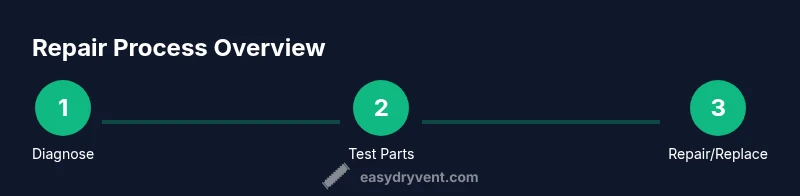
This section outlines a high-level flow you’ll follow while diagnosing and testing components. It helps you stay organized and ready to move to the hands-on steps. Remember: some dryers may require professional service for certain failures (for example, a faulty heating element or a compromised electrical board). The goal is to safely identify the fault, confirm it with measurements, and decide whether you can proceed with a repair or should contact a technician. Now, you’re ready to dive into the step-by-step diagnostic flow.
Authoritative sources
For safety standards and best practices, refer to trusted sources: the Consumer Product Safety Commission (CPSC), Energy Star guidelines for energy-efficient operation, and the National Fire Protection Association (NFPA) fire-safety tips related to clothes dryers. These resources provide additional context on safe installation, maintenance schedules, and when to seek professional help.
Tools & Materials
- Safety gloves(ANSI-rated work gloves for grip and protection)
- Safety glasses(Eye protection during disassembly)
- Screwdrivers set (Philips and flat-head)(Assorted sizes; magnetic tips recommended)
- Nut driver or socket set(For panel screws and fasteners)
- Multimeter(Continuity testing for fuses and heating elements)
- Vacuum or lint brush(Clean lint from ducts, vents, and interior)
- Replacement parts (as diagnosed)(Lint screen, vent hose, thermal fuse, etc.)
- Flashlight(Improve visibility in tight spaces)
- Non-conductive spray or silicone (optional)(Lubricate moving parts if needed)
Steps
Estimated time: 60-90 minutes
- 1
Unplug and verify power
Begin by unplugging the dryer from the wall outlet. If you’re comfortable, switch off the circuit breaker for extra assurance. This step protects you from electrical shock while you inspect panels and wiring.
Tip: Double-check by attempting a gentle power test only after you’ve confirmed the unit is unplugged. - 2
Access the interior safely
Remove the access panel or lower console to expose internal components. Keep track of screws and their locations, and photograph steps so you can reassemble accurately. Work slowly to avoid snapping tabs or bending delicate wires.
Tip: Label screws by location and use a magnetic tray to prevent loss. - 3
Inspect lint trap, vent hose, and ductwork
Clear lint buildup from the lint screen and thoroughly inspect the vent hose for kinks or disconnections. Check the exterior vent for obstructions and ensure air can flow freely through the entire run.
Tip: Only use metal foil tape for duct connections to maintain airflow and reduce leaks. - 4
Check the drum belt and pulley
If the drum doesn’t rotate smoothly, inspect the belt for wear or breaks and verify the pulley spins freely. A stretched or damaged belt is a common reason for no drum movement and will require replacement.
Tip: Test rotation manually with the drum removed to identify binding points. - 5
Test electrical components with a multimeter
With the unit powered down, use a multimeter to check for continuity in fuses, heating elements, and thermostats. Compare readings to the appliance’s service manual or manufacturer’s specs to confirm faults.
Tip: If you’re uncomfortable interpreting readings, consult a professional rather than guessing. - 6
Reassemble and perform a controlled test
Reconnect any disconnected components, reassemble the console, plug in the dryer, and run a short test cycle. Observe drum movement, heat generation, and noise. Stop the test if you detect smoke, burning odors, or abnormal heat.
Tip: Run a quick test at a lower heat setting first to confirm safe operation.
Common Questions
Can I fix a dryer myself, and when should I call a professional?
Yes for basic checks and simple replacements like a clogged vent or lint screen. If you encounter electrical issues, a noisy motor, or a faulty heating element, consider professional service. Complex electrical work can be dangerous without proper training.
You can handle simple fixes, but for major electrical or heating problems, call a pro.
What should I check first if the dryer won’t start?
Verify the dryer is plugged in, check the circuit breaker, inspect the door switch, and ensure the lint screen and vent aren’t obstructed. These basics often resolve start-up issues without tools.
Check power, door switch, and obvious blockages first.
How do I know if the heating element is faulty?
Use a multimeter to test continuity of the heating element and thermostat. If there’s no continuity where there should be, or readings don’t match the spec, the part is likely faulty.
Test with a multimeter and compare to the sensor specs.
Is dryer vent cleaning necessary for performance?
Yes. A clogged vent reduces airflow, efficiency, and can raise fire risk. Clean the lint trap, then inspect and clear the vent hose and exterior vent.
Yes—regular vent cleaning improves safety and efficiency.
What costs should I expect for repairs?
Costs vary with parts and labor; simple fixes may be inexpensive, while major component replacements can be more. Plan for a range and decide based on the fault severity and safety concerns.
Costs vary; discuss options with a technician if uncertain.
When should I replace the entire unit instead of repairing?
If multiple major components fail or the appliance shows escalating reliability issues, replacement may be more economical and safer than repeated repairs.
When several major parts fail, replacement is often wiser.
Watch Video
Key Points
- Identify symptoms first to guide repair scope
- Prioritize safety and disconnect power at all times
- Lint and vent cleanliness directly impact performance
- Use a methodical test flow to confirm faults
- Know when to call a professional for complex repairs