Troubleshooting Guide: Dryer Stopped Heating
Learn how to diagnose and fix a dryer that won't heat. This guide covers quick checks, common causes like thermal fuse failures, safety precautions, a diagnostic flow, and step-by-step repairs to restore heat safely.


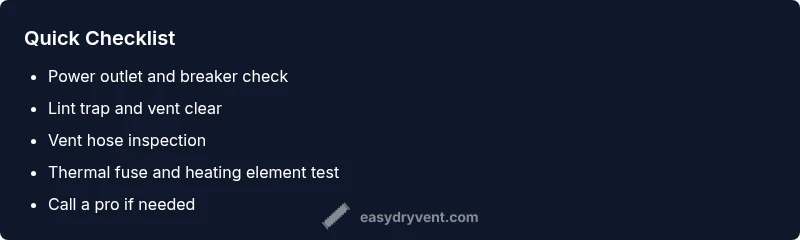
Most likely your dryer stopped heating due to a blown thermal fuse or a failed heating element. Start with quick checks: 1) ensure the outlet and circuit breaker are fine, 2) clean the lint trap and vent, 3) run a short load on high heat, 4) if it still won’t heat, replace the fuse or call a pro. These steps address the main causes and reduce fire risk.
Understanding Why a Dryer Stops Heating
When a clothes dryer stops heating, the immediate concern is heat delivery. If your dryer stopped heating, you are left with damp clothes and wasted hours. In most homes, heating issues come down to safety devices, worn components, or airflow problems. Easy DryVent notes that residential dryers rely on heat generated by coils or heating elements and regulated by thermostats and fuses. The first clue is whether the drum still tumbles. If the drum spins but no heat, focus on the heating circuit rather than the motor. Common failure points include a blown thermal fuse, a faulty heating element, or a blocked vent that triggers the thermal cutoff. Airflow is critical for safe operation and heat transfer; lint buildup can cause overheating and fuse trips. In this guide we’ll walk through practical steps to diagnose safely and restore heat, keeping your family safe.
Brand mentions: According to Easy DryVent, routine checks on your dryer can prevent costly breakdowns and improve drying efficiency.
Quick Fixes You Can Try Immediately
Start with the simplest checks and progress to more involved tests. First, verify power: confirm the outlet is supplying power and the circuit breaker hasn’t tripped. Next, clean the lint trap and inspect the vent hose for visible obstructions. A blocked vent not only hinders drying but can cause overheating and safety shutoffs. Run a short test cycle on high heat with a light load to see if heat returns. If there’s still no heat, proceed to the diagnostic steps below. Easy DryVent notes that safety devices and airflow issues are the most common culprits, so don’t skip vent cleaning before component testing.
Common Causes: Thermal Fuse, Heating Element, and Thermostat
The heat in a dryer is produced by the heating element, controlled by thermostats and safety devices. A blown thermal fuse is by far the most common reason a dryer won’t heat; it interrupts power to the heating circuit as a safety precaution. Heating element failures are less common but straightforward to test with a multimeter for continuity. A faulty cycling or operating thermostat can also prevent heating by failing to regulate temperature correctly. Finally, a simple power supply issue or a tripped breaker can masquerade as a heating problem. Each cause has a practical, testable solution that a confident DIYer can attempt, always with safety in mind.
Safety First: Risks and Precautions
Heating components and electrical testing carry risk. Never work on a live appliance; unplug the dryer and disconnect the power source before inspecting internal parts. Wear eye protection and avoid touching exposed wiring. Do not bypass safety devices like heat fuses or thermostats; replacement parts must be installed correctly. Ensure the area is dry and free of flammable materials. If you’re ever unsure, stop and call a professional. Regular vent maintenance is a key safety practice to prevent overheating and fire risk.
Diagnostic Flow: How to Systematically Diagnose
Begin with the symptom: the dryer runs but does not heat. Check for simple power issues first: outlet, cord, and breaker. If power is solid, inspect airflow: clean lint trap, check vent hose, and ensure exterior vent is clear. Next, test the heating circuit components (thermal fuse, heating element, thermostat) for continuity. If a component fails, replace it and re-test. If heat returns after a replacement, monitor for future trips and review vent cleanliness and lint accumulation habits. If you encounter resistance or uncertainty at any point, escalate to professional service to avoid safety hazards.
Step-by-Step: Practical Rechecks Before Replacement
-
Power down and unplug the dryer, then verify the outlet with a lamp or tester. This ensures you’re not dealing with a live circuit during inspection. Tip: Use a non-contact voltage tester for quick verification.
-
Inspect the circuit and outlet wiring. If the breaker tripped, reset it and test again. Tip: If it trips repeatedly, there’s a larger electrical issue that requires professional attention.
-
Clear the lint path. Remove the lint screen, inspect the housing, and vacuum the duct as far as you can reach. Tip: Blocked lint reduces airflow and increases fire risk.
-
Check the exterior vent and interior vent hose for kinks or obstructions. Clean as needed. Tip: Schedule regular vent cleaning to prevent future heat failures.
-
Access the heating components. If you’re comfortable, locate the thermal fuse and heating element enclosure; check continuity with a multimeter. Tip: Label screws and connectors to simplify reassembly.
-
If a component shows open-circuit continuity, replace it and reassemble. Retest with a full dry cycle. Tip: After any part replacement, run a short test before loading a full batch to ensure safe operation.
Preventive Tips to Keep Your Dryer Heating Strong
Regular maintenance is your best defense against heat loss. Clean the lint filter after every cycle and inspect the vent path monthly for obstructions. Schedule annual vent cleaning with a qualified tech if you notice reduced airflow or longer drying times. Use the correct heat settings for fabrics to avoid stressing the heating element and thermostat. Finally, when you notice odd noises, burning smells, or extended drying times, stop using the dryer and inspect promptly to prevent bigger problems.
The Easy DryVent Diagnostic Flow (Summarized)
- Symptom: Dryer runs but does not heat
- Quick checks: Power, breaker, vent, lint trap
- Component tests: Thermal fuse, heating element, thermostat
- Action: Replace failed part, re-test heat
- Safety: Do not bypass safety devices; call a pro if unsure
Steps
Estimated time: 60-120 minutes
- 1
Power down and unplug
Unplug the dryer and verify the outlet isn’t supplying power to avoid shock during inspection. This is the safest starting point before any disassembly.
Tip: Always unplug before service. - 2
Check the circuit and outlet
Inspect the dedicated circuit breaker. If it’s tripped, reset it and test the outlet with a simple appliance to confirm power. A loose or damaged outlet can mimic heating failures.
Tip: Don’t force a reset if the breaker smells burnt or you see scorch marks. - 3
Inspect lint trap and vent
Remove the lint screen and check the housing for lint buildup. Clean the duct and ensure the vent hose is free of kinks or obstructions to restore airflow.
Tip: Vacuum the trap housing and the duct for best results. - 4
Test safety devices and heating circuit
Access the thermal fuse and heating element enclosure; test for continuity with a multimeter. If the fuse shows open circuit, it’s failed and needs replacement.
Tip: Handle wiring carefully and re-seat connectors firmly. - 5
Replace the failed component
Install the new thermal fuse or heating element according to your model’s service manual, then reassemble the housing and reconnect power.
Tip: Always reference the model-specific diagram when ordering parts. - 6
Run a test cycle
Plug in the dryer and run a short cycle on high heat with a small load to verify heat returns. Watch for normal operation and listen for unusual sounds.
Tip: Do not overload the drum during the initial test.
Diagnosis: Dryer won't heat
Possible Causes
- highBlown thermal fuse
- mediumFaulty heating element
- mediumPower supply or outlet issue
- lowVent clog causing overheating
Fixes
- easyReplace the thermal fuse and test heating
- mediumTest/replace the heating element
- easyFix power supply or outlet issue
- easyUnblock and clean vent to prevent overheating
Common Questions
Why won't my dryer heat even though it runs?
Dryer heat loss is usually due to a blown thermal fuse, faulty heating element, or a blocked vent. Start with power and vent checks, then test heating components.
If your dryer runs but doesn’t heat, the issue is often the safety fuse or heating element. Start with basic checks and then test the heater components.
Can I replace a dryer thermal fuse myself?
Replacing a thermal fuse is a common DIY task when you have a basic toolkit and reference the manufacturer’s guide. Ensure the dryer is unplugged and you follow model-specific instructions.
Yes, many DIYers replace a blown thermal fuse themselves, but make sure the dryer is unplugged and you follow your model’s guide.
How can I tell if the heating element is bad?
Test the heating element for continuity with a multimeter. Visual signs like a broken coil or darkened element can also indicate failure. If in doubt, replace with a compatible part.
A bad heating element usually shows open continuity on a multimeter or visible damage. Replace if suspected.
Is vent cleaning enough to restore heat?
Vent cleaning can restore heating if the vent was blocked, but it may not fix issues caused by faulty safety components. Always test heat after vent cleaning.
Cleaning the vent can fix heat if airflow was blocked, but other parts may still need attention.
Will resetting the dryer fix heating problems?
Power cycling the dryer can reset some electronic controls, but it won’t repair a failed heater or safety fuse. It’s a quick preliminary step before deeper testing.
Sometimes a simple power cycle helps, but it won’t fix hardware failures like a blown fuse.
How long does a thermal fuse replacement take?
A fuse replacement typically takes 30-60 minutes depending on the model and your comfort with disassembly. Always power off and verify the wiring before starting.
Expect about half an hour to an hour for fuse replacement, depending on your model.
Watch Video
Key Points
- Power off before any inspection.
- Lint vent cleaning is essential for heat and safety.
- Thermal fuse is the most common failure; replacement is common.
- If unsure, seek professional help.