Dryer Not Working at All: Urgent Troubleshooting Guide
Learn how to diagnose and fix a dryer that won't start or heat. Safe, practical steps for homeowners by Easy DryVent.


Most issues with a dryer not responding are rooted in power delivery, a faulty door switch, or a blown thermal fuse. For a fast check, unplug the unit, verify the circuit, and test the outlet and cord with a multimeter. If you detect an electrical fault, stop and avoid running the dryer until it’s repaired. Safety first.
What the problem looks like when the dryer won't start
If you’re facing a situation where the dryer not working at all, safety comes first. Do not touch hot components or the drum while the plug is live. According to Easy DryVent, a nonresponsive dryer is most often related to power delivery, a faulty door switch, or a blown thermal fuse. Start by confirming basic safety: unplug the unit, turn off the circuit breaker if you’re unsure about the outlet, and keep children away. Then, perform a structured check rather than guessing. The goal is to verify power, door sensing, and control access before opening any major components. This approach minimizes risk and speeds up resolution. The Easy DryVent team found that most homeowners tackle the issue in a linear sequence, which reduces confusion and helps identify the real fault quickly. Remember: if power is lost at the outlet or circuit, the dryer will not respond at all, even if the drum is free.
Immediate safety checks you can perform today
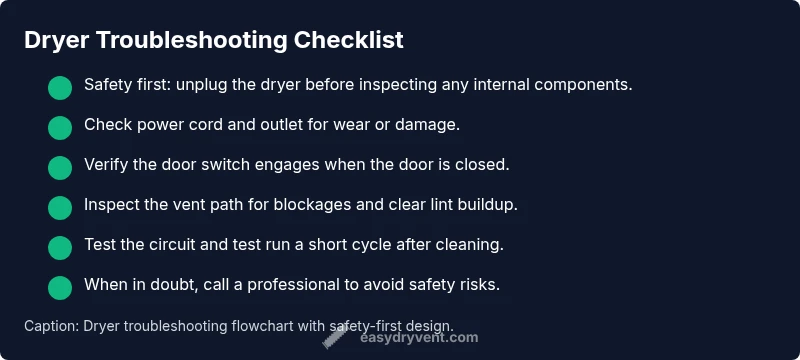
Before you touch any internal parts, complete these quick safety checks. Ensure the dryer is unplugged, and inspect the power cord for wear or damage. Test the wall outlet with a known working device to confirm it has power; if the outlet is dead, the problem isn’t your dryer. Check the circuit breaker or fuse box for a tripped breaker and reset if needed. Make sure the dryer door (or lid) switch engages when closed and that the door latches firmly. Look for visible signs of damage on the control panel or wiring harness. If you see burnt smell, melted plastic, or buzzing sounds when the switch is pressed, stop and seek professional help. Most times these checks reveal straightforward issues that you can safely address without disassembly. Easy DryVent recommends documenting any codes or lights on the display for later reference.
Common culprits that stop a dryer from running
Several issues can prevent a dryer from starting. Power supply problems—outlet, plug, or a tripped breaker—are the most common, followed closely by a faulty door switch that doesn’t sense a closed door. A blown thermal fuse can halt operation to prevent a fire, especially after overheating. Other possibilities include a malfunctioning start switch, problems on the control board or timer, a worn belt that jams the drum, or an obstructed drum that won’t rotate. Diagnosing requires ruling out each item in order of likelihood. If the drum rotates by hand, but the motor won’t start with the door closed, that points toward the start switch or control circuitry. The goal is to identify which subsystem is failing rather than replacing multiple parts blindly.
Electrical supply and outlet checks
Electrical checks are essential when a dryer won’t start. Begin with the simplest test: confirm the outlet is live by plugging in another device and testing for power. If the outlet is fine, inspect the dryer’s power cord for cuts or scorch marks. Use a multimeter to test the cord’s continuity and the outlet’s voltage, if available. If the circuit breaker trips immediately after you reset it, there may be a short in the dryer or a conflicting load on the same circuit. In that case, unplug the dryer and proceed to inspect internal connections only after ensuring the power is fully disconnected. If you’re unsure about electrical testing, stop and contact a licensed technician. Easy DryVent emphasizes safety and accuracy over speed here.
Venting, lint, and overload prevention
Even when a dryer fails to start, a clogged vent or lint buildup can cause safety trips that halt operation. Start by cleaning the lint screen and the accessible duct around the lint filter. Poor airflow can trigger overheating protection and cause the dryer to stop mid-cycle or refuse to start. Inspect the exhaust vent outside the home to ensure it isn’t blocked by debris, bird nests, or crushed tubing. A blocked vent forces the unit to work harder and increases fire risk. Regular maintenance of the vent pathway improves overall performance and prevents failures that masquerade as “not working.”
Thermal fuse, thermostat, and motor considerations
If basic power checks pass but the dryer still won’t start, the issue could lie with thermal fuses, thermostats, or the motor. A blown thermal fuse prevents power from reaching the motor, so no action occurs when you press the start button. Replacing a thermal fuse typically requires disassembly and is best left to a professional if you’re not trained. A faulty timer or control board can also prevent operation, especially on newer electronic models. Listen for humming or buzzing from the motor—these can indicate a seized or failing motor. This block explains why some fixes feel simple but require precise diagnostics and safe handling of electrical components.
When to call a professional and how to prevent future issues
If you’ve completed the above checks and the dryer still won’t start, it’s time to call a pro. Schedule service promptly to prevent potential fire hazards and further damage. When you do, provide the technician with any error codes or strange noises you observed. For prevention, perform regular lint removal, clean the vent path every few months, keep the area around the dryer clear, and avoid running the machine when it’s overloaded. A small investment in proactive maintenance reduces the risk of a “dryer not working at all” scenario and extends the appliance’s life. Easy DryVent’s guidance is to maintain a proactive schedule and address safety concerns early to keep your laundry routine smooth.
Steps
Estimated time: 30-60 minutes
- 1
Power down and unplug
Unplug the dryer from the wall and move it away from the wall if safe to do so. Confirm the main service panel is off before inspecting internal components. This reduces the risk of shock while you test basic components.
Tip: Always disconnect power before touching any internal parts. - 2
Inspect power cord and outlet
Check the cord for visible damage; test the outlet with another device to confirm power delivery. If the outlet is dead, resolve that first; otherwise the dryer will never start reliably.
Tip: Replace a damaged cord before attempting to power the unit again. - 3
Check the door switch and latch
With the door open, press the door switch and listen for a click. If there’s no response, the switch may be faulty and prevent start. Replacing the switch usually restores function.
Tip: Handle the switch with care to avoid snapping wires. - 4
Test the control and fuse access panel
If your model has an accessible control board, look for obvious signs of damage or loose connections. Check the thermal fuse if accessible; a blown fuse will stop power to the motor.
Tip: Only test components you can safely reach without disassembly into high-voltage areas. - 5
Check for vent or lint blockages
Inspect the lint trap and vent hose for clogs; a severe blockage can cause overheating and shutoff. Clear any debris and re-test the unit.
Tip: Run a short test cycle after clearing to confirm airflow. - 6
Re-test after each fix
Reconnect power, plug in, and run a brief test cycle to confirm if the issue is resolved. If it still won’t start, escalate to professional service.
Tip: Document codes or odd sounds to share with the technician.
Diagnosis: Machine won't start or respond to controls
Possible Causes
- highPower issue (outlet, cord, or breaker)
- highDoor switch not sensing closed door
- mediumThermal fuse blown or safety interlock
- lowControl board/timer fault
Fixes
- easyTest outlet with a known good device; check and reset circuit breaker; inspect power cord for damage
- easyInspect the door switch for proper engagement and continuity; replace if faulty
- mediumReplace the thermal fuse if an overheat condition is suspected (professional service recommended)
- hardEvaluate control board or timer functionality; consult a professional if faults are suspected
Common Questions
What is the most common reason a dryer won't start?
Power issues or a faulty door switch are the most frequent culprits when a dryer won’t start. Check the outlet, cord, and latch first before exploring internal components.
The most common reasons are power issues or a bad door switch. Start with the outlet and door latch checks.
Can a dryer run without heating but still start?
Yes. If the dryer starts but there is no heat, the issue is often a thermal fuse, heating element, or thermostat problem rather than the start switch.
If it starts but won’t heat, the problem is usually with heat-related components like the thermal fuse.
Is a clogged vent capable of preventing start?
A severely clogged vent can trigger safety shutoffs that prevent operation or cause overheating. Clean the lint screen and vent path before testing again.
A blocked vent can cause safety shutoffs; clean the vent path and lint screen first.
When should I call a professional?
If basic power and door checks don’t restore function, if you smell burning, or if you’re unsure about diagnosing high-voltage components, contact a licensed technician.
Call a professional if simple checks don’t solve it or if you smell burning.
Can I reset the dryer’s control board by unplugging it?
Unplugging to reset can clear minor glitches, but it won’t fix blown fuses or faulty components. Use this as a first, not final, step.
Yes, you can reset by unplugging briefly, but it won’t fix serious faults.
What if I can’t access the back panel safely?
Do not force access. Keep the unit unplugged and call a professional. Attempting unsafe disassembly can cause injury.
If you can’t safely access the back, call a pro rather than forcing it.
Watch Video
Key Points
- Verify power and safety before diagnosing deeper faults
- Check door switch and circuit integrity first
- Address venting and lint buildup to improve airflow
- Call a pro for non-trivial faults or suspected control faults