Why Your Dryer Is Making Noise: Quick Fixes and Diagnosis
Learn fast, practical steps to diagnose why your dryer is making noise and fix common causes safely. This guide covers belts, bearings, lint, foreign objects, blower issues, and when to call a professional for noisy-dryer repairs.


A worn drum bearing or loose belt is the most common cause of a dryer making noise. Start by unplugging the unit and removing the lint screen, then check for objects in the drum and belt slippage. If the noise persists, hand-rotate the drum to feel rough spots and replace worn parts. If grinding or burning sounds, call a pro.
Why the dryer is making noise
If you're wondering why dryer is making noise, the reason is often worn parts or debris left inside the drum or around the blower. According to Easy DryVent, a dryer that rattles, thumps, or screeches usually points to a failing drive belt, worn drum rollers, or a loose blower wheel. These components sit at the heart of the dryer's operation, and when they start to fail, you’ll hear sounds that range from a mesh of rattle to a high-pitched squeal. Start with the easiest checks—unplug the unit, remove the lint screen, and inspect the drum for foreign objects or fabric that can rub against the shell. While aesthetics are not the issue, a small piece of coin or a button tucked in between the drum and front panel can become a persistent noise source and a potential safety hazard. This is a common problem for busy households and novice DIYers, and it's usually solvable with a few careful inspections.
Common causes of dryer noise
Noise in a dryer can stem from several root problems, and the fix varies by the culprit. Here are the most frequent sources homeowners encounter:
- Worn or loose drive belt — When the belt slips or cracks, you may hear thumps, squeals, or a belt that rubs against the drum.
- Worn drum rollers or rear bearing — As these components wear, the drum may wobble, producing rumbling or grinding sounds.
- Foreign objects in the drum — Coins, buttons, or zippers can rattle and create sudden clanks.
- Loose blower wheel or motor pulley — A loose wheel or pulley can produce a fluttering or whistling tone during operation.
- Lint buildup in vent or blower housing — Restricted airflow can cause the motor to work harder and emit unusual noises.
Understanding which category your noise fits into helps you decide whether it’s a quick DIY fix or a signal to call a professional. Easy DryVent notes that most noises are resolve-able with basic inspection, but ignored issues can escalate into safety risks and costly repairs.
Immediate checks you can perform safely
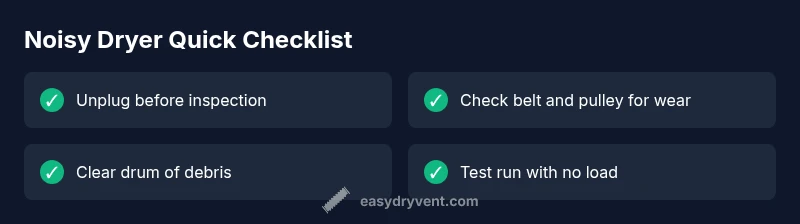
Before diving into disassembly, perform a quick sweep of safety steps and simple checks:
- Unplug the dryer and disconnect from power. Never work on energized appliances.
- Inspect the lint trap and vent path for blockages; a clogged vent can cause strain and noise.
- Open the drum inspection zone and look for obvious foreign objects like coins or keys.
- Manually rotate the drum gently (with the belt still in place, if you’re not sure about belt status) to feel for rough spots or resistance.
- If you find a visible wear pattern on the belt or obvious damage to any rollers, mark the parts for replacement and proceed with caution. If you detect grinding, burning, or a suspected motor issue, stop and contact a professional immediately. Easy DryVent’s practical approach emphasizes identifying the simple issues first and escalating only when necessary.
Diagnostic flow overview
To systematically diagnose a noisy dryer, follow this flow:
- Symptom check: Note the exact sound (rattle, thump, squeal, or rumble) and when it occurs (start, mid-cycle, or cooldown).
- Quick cause mapping: Use the symptom to categorize potential causes (belt, bearings, debris, blower).
- Safety first: If you suspect electrical or motor grinding, stop and seek professional help.
- Apply fixes step-by-step: Start with easy checks (lint, debris, belt wear) before moving to component replacement.
- Verify and test: Reassemble carefully and run a short cycle with no laundry to confirm the fix.
If this flow doesn’t resolve the issue, the next steps involve more involved disassembly and component replacement, which is described in the step-by-step guide. Always consider professional service for complex repairs.
How to diagnose and prepare for a belt replacement
The drive belt is a frequent culprit when a dryer makes noise. Start by unplugging the unit and accessing the belt area. Inspect the belt for cracks, fraying, or missing teeth. If you see wear, belt replacement is often straightforward but requires precise alignment during reassembly. Gather a compatible belt for your dryer model, a torque driver or screwdriver, and a clean workspace. Take photos during disassembly so you can re-create the correct routing. If you encounter a stretched belt or accompanying worn components (idler pulley, tension spring, drum rollers), plan for simultaneous replacement to prevent repeat failure. Remember, belt replacement is a common DIY fix, but if you’re unsure about belt routing or feel resistance when turning the drum, pause and consult a professional.
Safety, prevention, and next steps
Prevention is the best cure for noisy dryers. Regular lint removal, vent cleaning, and periodic belt inspection reduce wear and noise. After repairs, run a test cycle with no load to confirm quiet operation and verify that the drum spins freely without rubbing. Keep a maintenance log to track belt ages and vent cleanliness. The Easy DryVent team emphasizes routine checks as a safeguard against future noises and longer-term damage. If you hear grinding, persistent high-pitched sounds, or warmth near the vent, stop using the machine and contact a technician promptly to avoid fire risk or electrical hazards.
Steps
Estimated time: 40-70 minutes
- 1
Power down and access belt area
Unplug the dryer and pull it away from the wall to access the back or front panel. Remove the vent hose if needed to gain access. This step ensures your safety and provides a clear view of the belt path.
Tip: Keep a magnetic tray for screws and a camera to document routing. - 2
Remove front panel (if required)
Gently detach the front panel or toe panel to expose the drum and belt. Support the drum so it cannot fall when removing components. Do not force panels off; use the proper screws and tools.
Tip: Take photos of each stage to aid reassembly. - 3
Inspect the drive belt
Check the belt for cracks, glazing, or breaks. If damaged, remove it and note its routing. A stretched or cracked belt will slip and cause noises.
Tip: Check for wear on pulleys and tensioners as well. - 4
Replace the belt
Install the new belt along the correct grooves and ensure the belt sits properly on all pulleys and the drum. Reposition any tension devices as required.
Tip: Use the original belt part number or an OEM-equivalent belt for proper fit. - 5
Reassemble and secure panels
Reattach the front or rear panel, reconnect the vent, and ensure all screws are tightened. Double-check the belt path before proceeding.
Tip: Double-check screws’ tightness to avoid rattles later. - 6
Test run
Plug the dryer back in and run a short cycle with no load. Listen for new noises and ensure the drum spins smoothly.
Tip: If you still hear noise, stop the cycle and reassess belt tension or worn bearings.
Diagnosis: Dryer makes unusual noise (banging, rumbling, or squealing)
Possible Causes
- highWorn or loose drive belt
- highWorn drum rollers or rear bearing
- mediumForeign objects in drum or blower housing
- lowLoose blower wheel or motor pulley
Fixes
- easyUnplug the dryer, remove the access panel, and inspect the drive belt for wear or looseness; replace if damaged
- hardInspect drum rollers, axles, and front/rear bearings; replace worn parts and re-test
- easyClear foreign objects from the drum and blower housing and re-test
- mediumTighten or reseat the blower wheel, motor pulley, and belt guides; ensure nothing rubs the drum
Common Questions
What is the most common cause of a noisy dryer?
The most common causes are a worn drive belt or damaged drum rollers. Inspect these parts and replace as needed.
The most common causes are worn drive belt or damaged drum rollers.
Can I fix a noisy dryer myself?
Some fixes like belt replacement or debris removal are doable with care, but many repairs require professional service.
Yes, some fixes you can do, but some repairs need a pro.
Is a noisy dryer dangerous?
Noise itself isn't always dangerous, but underlying issues can pose fire risk if lint builds up or parts overheat.
Noise can signal dangerous issues like overheated components; stop using and inspect.
How long does belt replacement take?
Time varies by model and skill; plan for a session where you can safely complete the repair.
It varies, but belt replacement can take a bit of time depending on your model and tools.
When should I replace the dryer instead of repairing?
If the drum is severely damaged or multiple major components fail, replacement might be more practical.
If major parts fail or the dryer is very old, replacement could be wiser.
Should I call a professional if I hear grinding?
Yes. Grinding could indicate motor or bearing failure; stop and contact a technician promptly.
Grinding often means a motor or bearing issue; stop and get a pro.
Watch Video
Key Points
- Unplug and inspect the belt first when noise starts
- Replace worn belts or drum rollers to stop the noise
- Clear lint and debris to prevent noise and fire risk
- Call a professional for grinding or persistent noises